



When several people use the same phone or tablet, storage problems become everyone’s problem. A child’s screenshots, a parent’s forwarded videos, and a shared camera roll can quietly turn a device into a confusing pile of near-identical files. I found Clean Manager: Storage Cleaner useful in that exact situation because it focuses on practical cleanup rather than trying to become a full file-management system. It is a free tools app from Shlag, aimed at finding wasted space through duplicate removal, screenshot cleanup, and photo and video compression.
My first impression was that it makes the unpleasant part of phone maintenance easier to approach. Instead of opening folders one by one, I could use a single place to review likely clutter. That does not mean I would let it make every decision automatically, especially on a shared device. The real value is in speeding up the inspection while keeping the final choice with the person who knows which memories, school files, or work documents matter.
How Clean Manager fits a shared household device
A realistic example is a family tablet used for travel. One person downloads images, another takes screenshots of booking details, and someone else saves short videos for offline viewing. After a few trips, the device may contain several copies of the same picture without anyone knowing which one is the original. Clean Manager gives the household a starting point for sorting that mess instead of asking one person to remember where every file came from.
I would use it in stages. First, I would look at duplicate suggestions and remove only the obvious repeats. Next, I would review screenshots, because these are often temporary captures of menus, conversations, receipts, or maps. Finally, I would consider compression for large photos and videos. That order matters: deleting disposable material is less risky than changing the quality of something the family may want to keep.
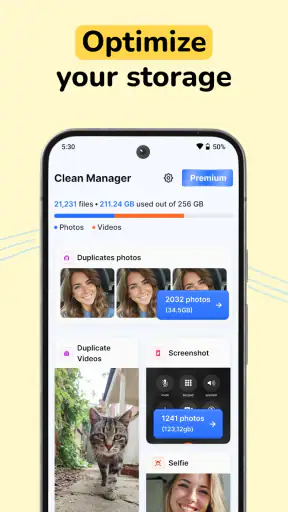
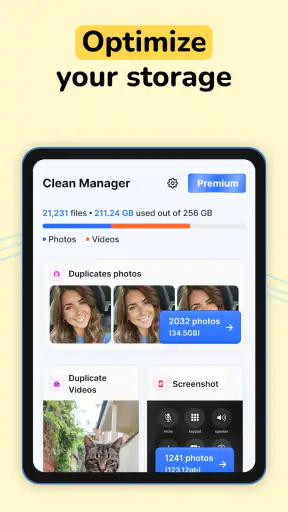
The app’s store summary mentions cleaning space, removing duplicates, clearing screenshots, and compressing photos and videos. Those tasks cover the most common forms of household clutter, but they are not interchangeable. A duplicate can be disposable, while a compressed video may still be important. I appreciate that the cleanup categories encourage different decisions rather than treating every large file as waste.
One useful habit is to make the person who created the content part of the review. If a teenager’s screenshots are selected for deletion, I would ask them to check the group first. If a family member’s videos are candidates for compression, I would confirm that the original quality is not needed. This is less about technical skill than ownership: a cleaner should help the household coordinate, not silently decide what the household values.
What the cleanup categories are good at
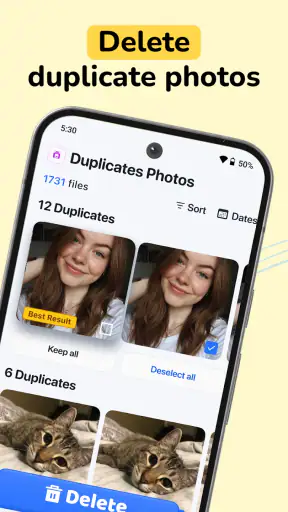
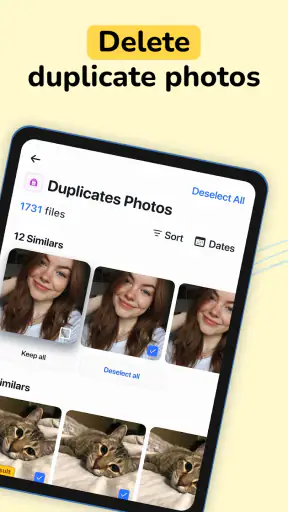
Duplicate finding is most helpful after bursts of activity. A shared phone can receive the same image through messaging, downloads, and camera backups. Reviewing those candidates together can expose redundant copies that are hard to spot in a normal gallery. I would still inspect thumbnails carefully, because visually similar images may show different moments even when they look almost identical at first glance.
Screenshot cleanup is particularly practical for people who use their phone as a temporary notebook. I often take screenshots to remember a timetable, product detail, address, or instruction, then forget about them. In a household, that habit multiplies across several users. The screenshot category can turn a buried collection into a manageable review, but I would not clear it immediately after an important event. Travel confirmations, medical instructions, and school notices should be checked before removal.
Compression is the most important area to approach slowly. It can make sense when a device is full of casual recordings that only need to be watched on a phone. It is less suitable for original family videos, editing projects, evidence, or anything someone may print or reuse later. My practical rule is simple: clean disposable files first, compress copies or low-priority media second, and preserve originals when quality has long-term value.
Setting boundaries before anyone taps delete
Clean Manager is not a substitute for household rules. Before using it on a shared device, I would agree on a few boundaries: which folders or media belong to which person, what counts as safe to remove, and whether important items have already been backed up elsewhere. The app can make candidates easier to see, but it cannot know whether a screenshot is a forgotten advertisement or the only copy of a school assignment.
I also recommend cleaning when the device is not needed urgently. A rushed cleanup before leaving the house encourages careless selections. A quiet session gives each person time to review their own material and reduces arguments about missing files. This is one of the less obvious strengths of a focused cleaner: it creates a clear occasion for maintenance, whereas ordinary gallery browsing tends to become an endless, unfocused scroll.
For a shared tablet, I would separate cleanup sessions by user rather than handing the device around while a large list is open. That makes it easier to ask, “Are these yours?” and prevents one person from approving a selection they do not understand. It also creates a simple record in everyone’s memory of what was cleaned and why, even without inventing a formal family-management system that the app does not claim to provide.
There is another boundary worth considering: do not treat free space as the only goal. A household may gain room by compressing everything, but the cost could be lower-quality memories or frustration when an original is needed. I prefer a smaller, deliberate cleanup that protects meaningful files over a dramatic purge that nobody can undo comfortably.
Coordinating cleanup without built-in family controls
Because this is a general tools app, I would not approach it as though it were a parental dashboard or a multi-account organizer. Its role is narrower and more useful: it helps the current device user inspect storage candidates. Coordination therefore happens through conversation and timing, not through assumptions about separate profiles or automatic permissions.
That distinction matters when adults and children share a device. A parent may be responsible for the tablet, but a child may recognize which drawings, game captures, or class images are important. I would let the younger user identify what should stay, then have an adult perform the final review. This keeps the process practical without pretending that an automated cleaner understands personal context.
For couples or roommates, I would use a similar approach. Before a cleanup, each person can claim their own media categories or review them in turn. If one person records many videos and the other saves many screenshots, the app’s separate cleanup purposes make it easier to divide the job. The household does not need a complicated system; it needs a clear agreement about who gets the final say.
A useful workflow is to start with the least controversial material. Screenshots of expired promotions and repeated downloads are usually easier to judge than camera videos. Once everyone sees how the review works, they can decide whether to examine duplicates or compression candidates. This gradual approach reduces the common mistake of opening a cleaner while annoyed by a storage warning and approving too much at once.
I would also avoid using the app as a substitute for communicating about backups. If a file exists in a cloud gallery, that may change the risk of deleting a local copy, but the app itself should not be treated as proof that every important item is safely preserved. When a photo has emotional or practical value, I want a separate confirmation before removing or altering it.
Age, trust, and the meaning of an Everyone rating
Clean Manager carries an Everyone content rating, which fits its straightforward storage-maintenance purpose. That makes it easier to consider for a household device used by different ages. Still, an age rating does not remove the need for supervision around deletion. The main risk here is not unsuitable content; it is an innocent mistake involving a file that another family member wanted to keep.
For younger users, I would frame the app as a sorting tool rather than a button that makes space magically. They can learn to recognize repeated images, temporary screenshots, and media that no longer matters. An adult should remain involved when the action affects shared photos or videos. This turns cleanup into a small digital-literacy exercise: storage has limits, files have owners, and convenience should not outrank trust.
Older children and teenagers may be capable of handling their own categories, but I would still explain the difference between deleting and compressing. Removing a file changes whether it remains available, while compression changes how it is stored or presented. That distinction is easy to overlook when someone is focused only on the storage bar. A short conversation before the first session can prevent a lot of resentment later.
Adults should be equally careful. People often assume they understand every image on a shared device because they pay for or manage it, yet personal media can have private context. I would not use a household cleanup as an excuse to inspect someone else’s content unnecessarily. The best experience comes from reviewing only what needs attention and letting each person retain reasonable control over their own files.
Everyday performance and practical trade-offs
Clean Manager is free to install, which lowers the barrier to trying it on a crowded device. The app has a 4.4 average from around 25 thousand ratings and has passed five million installs, so it is clearly being used at a meaningful scale. Those figures make it easier for me to take the app seriously, but they do not replace personal caution: a popular cleaner can still present a suggestion that needs human judgment.
The current version is 1.27.0, and it requires Android 8.0 or newer. That makes the compatibility question fairly simple for many Android households: check the operating system on the older shared phone or tablet before planning a cleanup session. If that device is below the requirement, this particular workflow is not an option there, regardless of how useful the categories sound.
The app is free, but in-app purchases range from $6.99 to $99.99 per item. I would pay attention to the point at which the free experience ends before committing to a household routine. For occasional cleanup, a free starting point may be enough. For a family that expects to use advanced or repeated cleaning tools, the possible purchase range is important when comparing it with built-in storage tools or other cleaners.
That price consideration changes my recommendation slightly. I would not install it on every family device automatically. I would test it first on the device with the clearest storage problem, learn which tasks are genuinely useful, and then decide whether any paid option offers enough value. A cleaner should save time and reduce stress; it should not become another subscription-like expense that nobody in the household understands.
Another trade-off is convenience versus visibility. A dedicated cleaner brings duplicate and screenshot work into one focused place, which is faster than searching manually. The downside is that a focused list can create false confidence: seeing a group of similar files does not guarantee that every item is disposable. I prefer the app as a review assistant, not as an unattended maintenance robot.
How it compares with the usual alternatives
The first alternative is the phone’s built-in storage manager and gallery. Those tools are often enough for checking large files, deleting obvious downloads, and managing applications. They may be the better choice for someone who wants the fewest extra components or who only cleans once every few months. Clean Manager becomes more appealing when duplicate photos, screenshots, and media compression are the main problem and the user wants those tasks presented together.
A second alternative is manual browsing through a file manager. Manual control is excellent for people who understand folders and want to verify every path. It is also safer for work documents, school projects, and mixed personal files where context matters more than speed. Clean Manager offers a more approachable route for visual media clutter, but I would still return to a file manager when the cleanup involves folders whose purpose is unclear.
Cloud photo services can also reduce local storage pressure, especially when a household already uses automatic backup. Their strength is keeping a broader library available across devices. Their weakness is that backup and cleanup are not the same decision: removing a local copy may be fine in one setup and risky in another. Clean Manager is better viewed as a local inspection layer, not a replacement for a family’s backup strategy.
Finally, some phones include manufacturer-specific optimization tools. Those may integrate more closely with the device and may be preferable when someone wants one system utility with no extra learning. I would choose Clean Manager when its targeted review of duplicates, screenshots, and compression matches the household’s immediate issue. I would choose the built-in option when the goal is simply to see what is consuming space and remove a few obvious items.
Who should use it, and who should skip it
I think Clean Manager is a good fit for families sharing an Android phone or tablet, people who take many screenshots, and anyone whose gallery has accumulated repeated images and casual videos. It is also useful for the household organizer who wants to lead a short, understandable cleanup session rather than teach everyone a complicated file hierarchy.
I would be more cautious recommending it to photographers, video editors, collectors of original media, or anyone who needs exact control over file quality and location. Compression may not suit their work, and duplicate suggestions still require careful inspection. Users with sensitive documents should also keep the review narrow and avoid treating visual similarity as proof that two files have the same purpose.
People who rarely run out of space may not gain much from installing another tool. The built-in gallery and storage settings can handle occasional housekeeping without adding a separate workflow. Clean Manager earns its place when clutter is recurring and specific: repeated media, forgotten screenshots, or large files that need a considered quality trade-off.
My household verdict
After looking at it as a shared-device tool rather than just a personal cleaner, I see Clean Manager: Storage Cleaner as a practical assistant for organized review. Its strongest contribution is not a promise to solve storage by itself. It is the way it brings common clutter types into a conversation that a household can manage together.
I like it most when the rules are clear: the owner checks personal files, an adult helps with shared material, and nobody compresses an important original simply to make a storage warning disappear. The app can make that process faster and less intimidating, especially for screenshots and obvious duplicates. It cannot replace backups, account boundaries, or trust, and I would not ask it to.
For an Android device running version 8.0 or later, the free entry point makes a trial reasonable. Start with disposable screenshots, inspect duplicate suggestions one group at a time, and treat compression as a separate decision. If the household needs total manual control or handles professional media, the built-in tools or a file manager may be the better fit. For ordinary shared-device clutter, though, Shlag’s app is a sensible way to turn a frustrating storage problem into a short, cooperative task.


